
Overview
This guide explains how overtime is earned, classified, and calculated for non-exempt employees in Workday, including differences between Federal (FLSA) and State overtime and key configuration settings that impact processing.

Overview
This reference guide explains how overtime is earned, tracked, and paid for non-exempt employees in Workday. It covers the differences between Federal (FLSA) and State overtime, how overtime is classified and calculated, and how configuration settings like the Comp Time Banked ID and the Exclude from Overtime flag affect processing.
Key Points:
- The difference between Federal (FLSA) and State Overtime
- How to identify which type of overtime applies using time sheet examples
- How to determine if overtime will be Banked or Paid
- How to update or remove Comp Time Banked IDs in an employee profile
- How the Exclude from Overtime Flag affects eligibility and calculation
- How overtime is calculated in Payroll, including the FLSA average base rate
- When and how to recalculate a timesheet after making changes
Federal Overtime (FLSA Comp Time)
From Texas A&M System Guidelines Overtime 31.01.09 Section 1.1
“Under the Fair Labor Standards Act (FLSA), a federal statute, a nonexempt employee must be compensated with either time or pay for working more than 40 hours in a workweek. (See Section 3, FLSA Overtime.)…”
Non-exempt employees earn federal overtime, also known as FLSA comp time, when they work more than 40 hours in a workweek.
Important: Paid leave or scheduled holidays do not count toward the 40 hours required to trigger FLSA comp time.
Examples of Federal Overtime
- An employee works 42 hours and also took 8 hours of paid sick leave: Only the 42 worked hours count, so 2 hours qualify for federal overtime.
- If an employee has an Additional hourly job, Workday will tag the hours in the Additional Job as overtime once the combined hours exceed 40 in a week.
State Overtime (State Comp Time)
From Texas A&M System Guidelines Overtime 31.01.09 Section 4.1
“When an employee has not worked more than 40 hours in a workweek, but the total hours worked and hours of paid leave or paid holidays exceed 40 hours, the employee is allowed one hour of compensatory time off for every hour in excess of 40 in a workweek. Likewise, when the employee has worked more than 40 hours in a workweek and the total of hours worked and hours of paid leave or paid holiday exceed 40 hours after subtracting FLSA overtime hours worked (which must be compensated as described in Section 3), the employee is allowed equivalent compensatory time off for the excess hours.”
Non-exempt employees earn state comp time when their combined total of hours worked + paid leave + scheduled holidays exceeds 40 hours in a workweek, but actual hours worked are 40 or fewer.
- This is paid at straight time: one hour of comp time for each qualifying hour.
System Holidays
From Texas A&M System Guidelines System Holidays 31.04.01 Section 2 & 3
Section 2: An eligible part-time employee receives holiday pay and holiday compensatory time on a proportionate basis.
Section 3.2: “…An employee required to work on a scheduled holiday is entitled to compensatory time, for the amount of time worked on an hour-for-hour basis…”
Example of State Overtime
- An employee works 36 hours and takes 8 hours of vacation: 44 total hours = 4 hours of state comp time
- An employee works 40 hours and has 8 hours of holiday leave: 48 total hours = 8 hours of state comp
- An employee works 42 hours and takes no leave: This qualifies for federal, not state, overtime.
Quick Comparison of State and Federal Overtime
| Federal Overtime | State Overtime | |
| Applies When… | Hours worked exceed 40 | Total time (work + leave) > 40, but actual hours worked ≤ 40 |
| Leave/Holiday Counted? | ❌ No | ✅ Yes |
| Example | 42 worked hours → 2 hours FLSA comp | 36 worked + 8 leave → 4 hours state comp |
Time Sheet Examples
More than 40 Hours Worked (Federal Overtime)
| Scenario | What happens |
| Employee works 44 hours, no time off or holidays. |
|

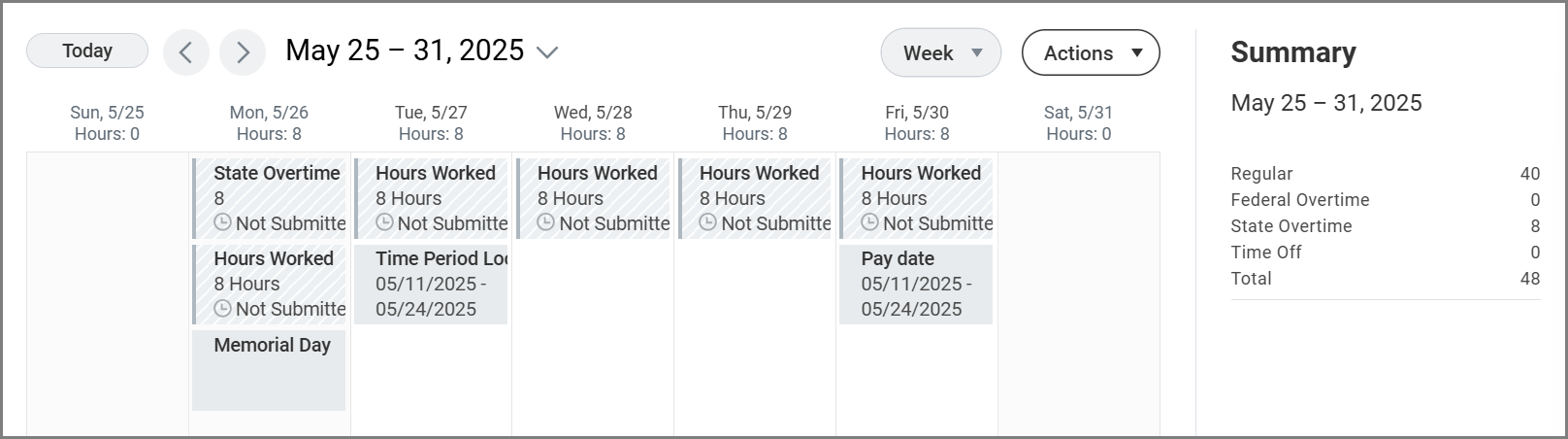
Work on a Holiday (State Overtime)
| Scenario | What happens |
| Employee works 40 hours, including 8 on a holiday |
|
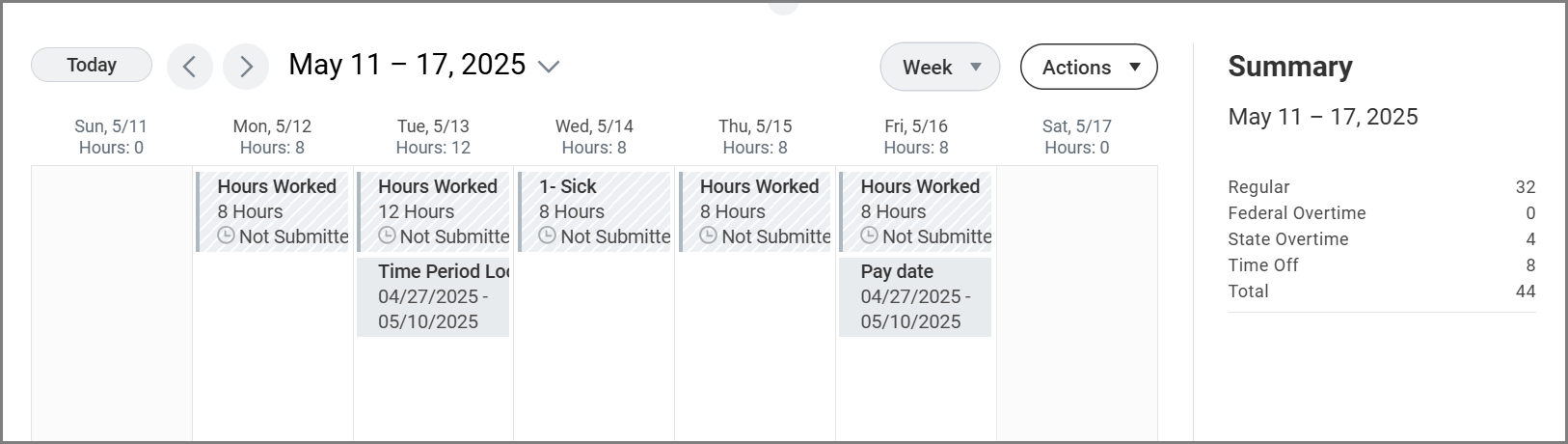
Worked ≤ 40, but Total Time > 40 (State Overtime)
| Scenario | What happens |
| An employee works 36 hours and uses 8 hours of time off. |
|
Worked on a Holiday + Over 40 Hours (State + Federal Overtime)
| Scenario | What happens |
| An employee works 44 hours, including 8 hours on a holiday. |
|

Worked Over 40 + Took Time Off (State + Federal Overtime)
| Scenario | What happens |
| An employee works 44 hours and has an 8 hour holiday. |
|

Determining If Overtime will be Banked or Paid
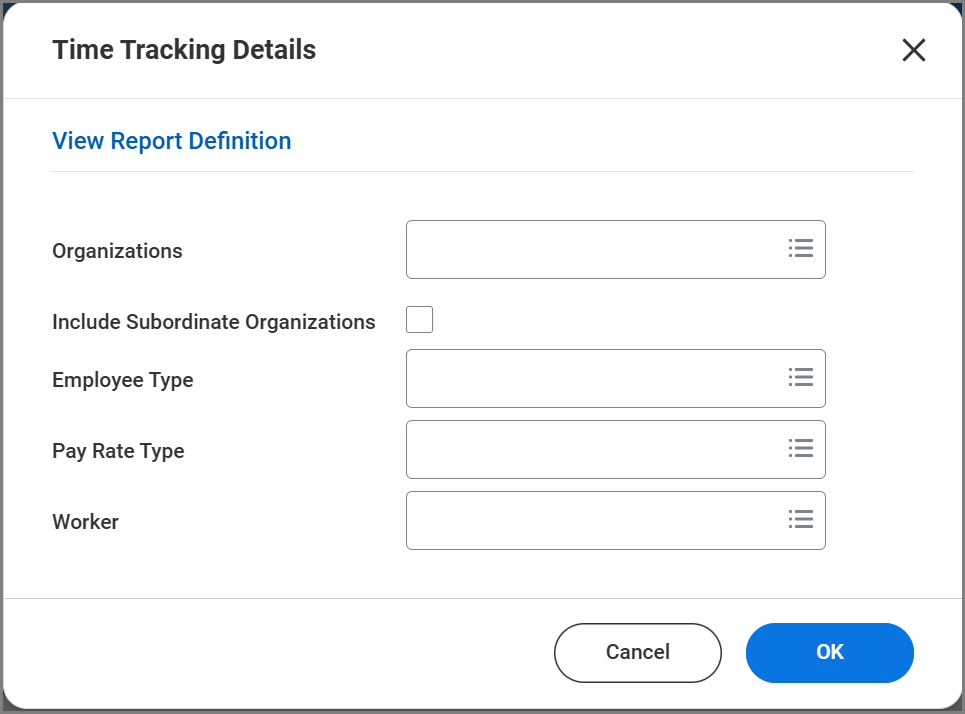
HR Partners, Payroll Partners, and Timekeepers can use the Time Tracking Details report in Workday to determine whether Federal or State Overtime will be banked or paid.
- Banked means the employee will receive compensatory time off (Comp Time) to use in a future pay period.
- Paid means the employee will receive payment for the overtime hours in the current pay period.
How to Check
- Run the Time Tracking Details report in Workday

- Review the columns:
- Federal Comp Time Banked ID
- State Comp Time Banked ID

| Federal or State Comp Time Banked ID Value | Meaning | Result |
| Y | Custom ID is in place | Overtime will be Banked |
| N | Custom ID is in place | Overtime will be Paid |
| (Blank) | No Custom ID in place | Defaults to Overtime will be Banked |
What Happens after Submission
Once a time sheet is submitted, Payroll uses job pay rates, shift differential, and other compensable elements to calculate the Employee’s FLSA average base rate and final overtime payout.
Paying Banked Comp Time
Paying out banked comp time is a manual process. It involves two steps:
- Adjusting the accruals manually
- Submitting a manual payroll entry,
- Either through a payroll input or an off-cycle payment.
Refer to the following job aids for guidance:
- Maintain Accrual (Using Lump Sum – FLSA Comp or Lump Sum – State Comp as the type of accrual adjustment)
- Add Payroll Input by Worker
- Managing Off-Cycle Payments.
Calculation Overtime in Payroll
Regular FLSA Overtime Calculation
Important: Non-exempt employees covered by the Fair Labor Standards Act(FLSA) must be paid at least 1.5 times their regular rate of pay for all hours worked over 40 in a workweek.
Example:
The employee holds two jobs:
- A primary job at $22.50 per hour
- An additional job at $200 per hour
The employee also receives a shift differential of $1 per hour for 2 hours worked during the FLSA period.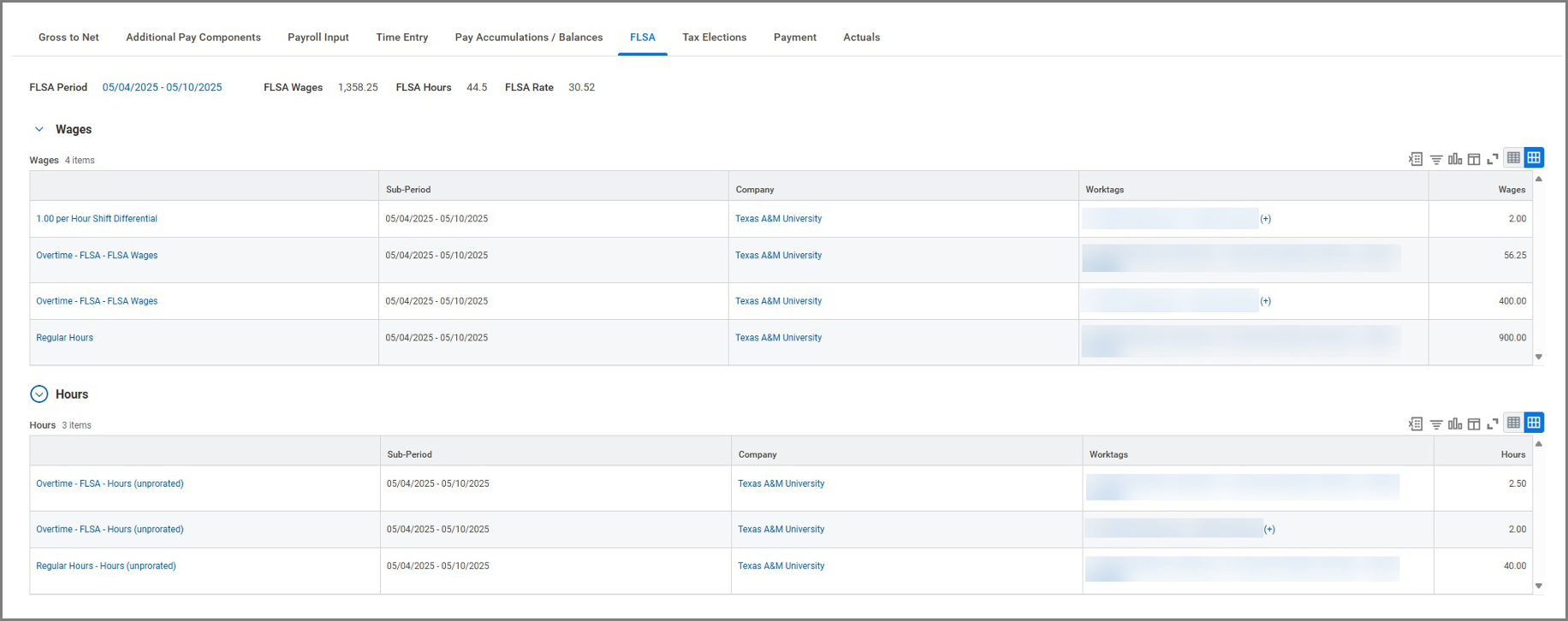
FLSA Premium Calculation in Payroll
On the Gross to Net tab of the Pay Result, the Overtime – FLSA Earning is calculated using:
| Field | Definition | Example |
| Original Rate | The hourly rate of the position where overtime is earned | $22.50 |
| FLSA Base Rate | The FLSA Average Base Rate (calculated from all earnings ÷ hours) | ($2 + $56.25 + $400 + $900) ÷ (2 + 2.5 + 40) = $30.52/hour |
| Considered Amount | Annual longevity pay ÷ 2080 hours | $960 ÷ 2080 = $0.46/hour |
| Premium Rate | (Base Rate + Considered Amount) * 0.5 | (30.52 + 0.46) * 0.5 = $15.49/hour |
| Final Rate | Original Rate + Premium Rate | (22.50 + 15.49) = $37.99/hour |
This rate is calculated for each job and is used to FLSA overtime hours, ensuring compliance with federal overtime laws across multiple positions and pay rates.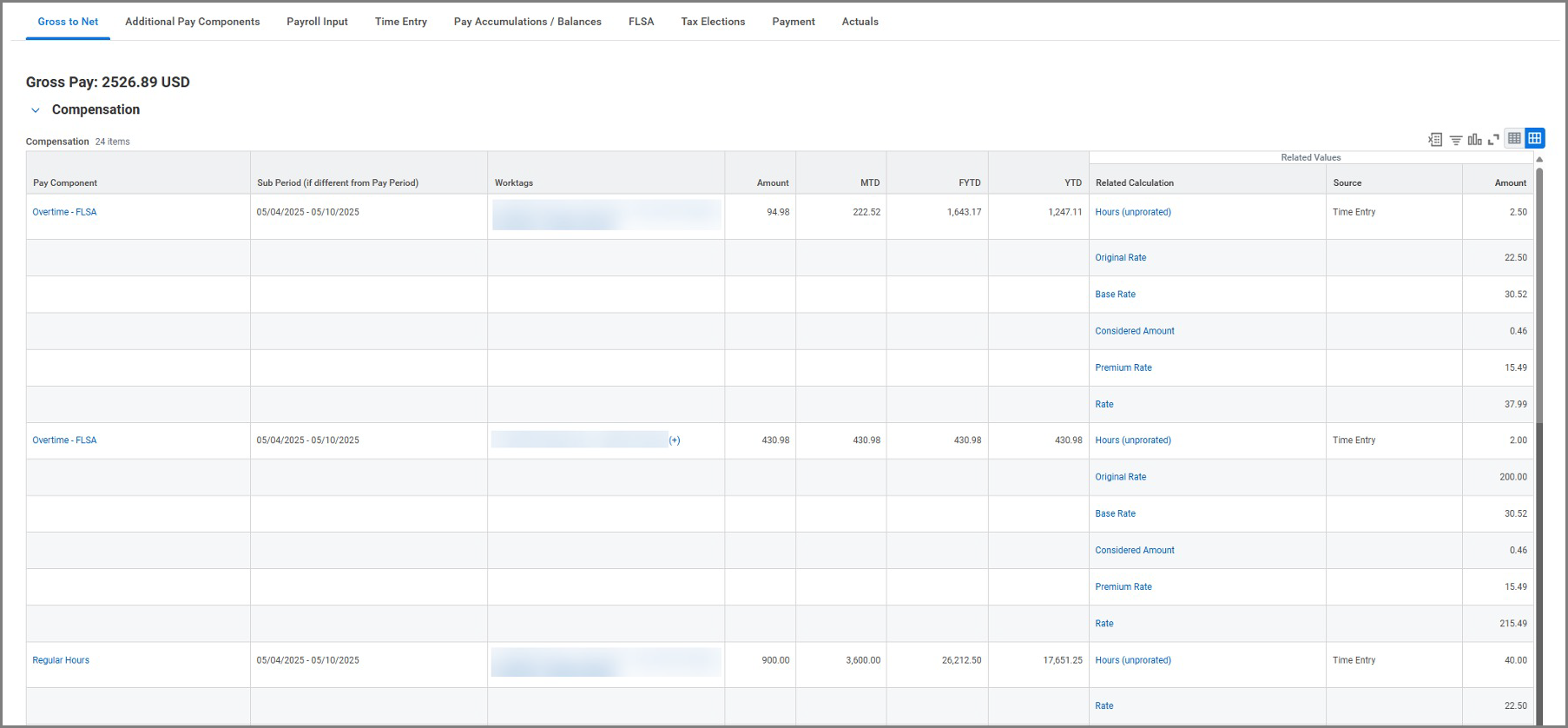
Calculating Straight/State Overtime
Important: If a non-exempt employee earns State Overtime, these hours must be compensated at the employee’s regular hourly rate (1x), either as paid overtime or as state compensatory time.
Example
This employee worked 39.5 hours and used 4 hours of Paid Time Off from Banked Overtime.
Total Reported Hours = 39.5 + 4 = 42.5 hours
Because actual hours worked are under 40, and total time exceed 40, this qualifies as State Overtime. As a result, the employee will be paid at straight time, or 1x the hourly rate for 3.5 overtime hours.
Maintaining Comp Time Banked IDs
In most cases an assigned HR Partner, Payroll Partner, or Timekeeper will maintain the input to adjust the Banked OT custom ID for an employee.
From the Employee’s Worker Profile navigate to Actions > Personal Data > Edit Other IDs

- Select the Plus Sign (+) icon to add a new Other ID. You can also remove an Other ID by selecting the Minus Sign (-) for that row.
- Fill out the following fields:
- Other ID Type.
- Description. Add a note with your name and the date of the change. This helps with future tracking.
- Identification #. Y to Bank overtime, N to have overtime be Paid. Any other entry will cause an error.
- All other fields can be left blank, they do not affect whether OT is banked or paid.
- Select Submit to finalize changes.
Important: The Y/N value in the Comp Time Banked ID field determines whether Federal or State overtime is banked or paid. If an employee’s timesheet was already submitted before the ID was updated, the system will not recalculate automatically. To fix this, go to the timesheet and select Actions > Run Calculations to apply the new setting.
How to Exclude Hours from Overtime (HR Partner)
We have configured Workday such that hourly employees are eligible for overtime. If you are not legally required to include hours worked in a particular position in the overtime calculation, the job classification Exclude from Overtime must be added to those positions.
If an Exclude from Overtime Flag needs to be applied to a position, an HR Partner will need to initiate a Change Job business process to update the Job Classification.
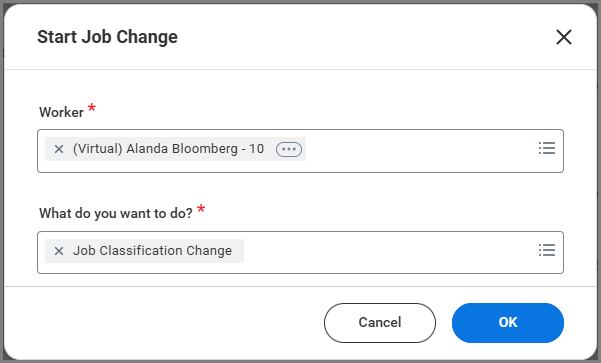
- From the Employee’s Worker Profile select Actions > Job Change > Start Change Job.
- In the field What do you want to do? select Job Classification Change then OK.
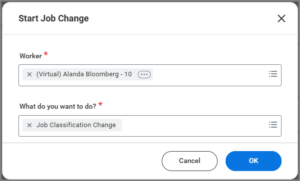
- Select when the effective date for this change to take place.
- For Additional Job Classification(s), search and choose Exclude – Exclude from Overtime (Overtime Flag).
- Select Submit.
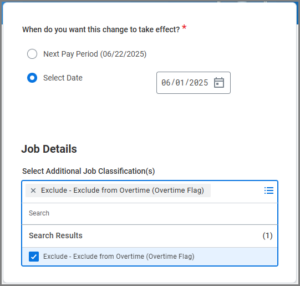
Note: Any worked Hours entered for this position following the effective date will no longer Calculate for Overtime.

Example of Exclude from Overtime Flag
The employee has worked 40 hours in the primary job and 2 hours in the additional job. Since the Exclude from Overtime Flag is set for the additional job the 2 hours are not being calculated as FLSA Overtime.