
Overview
Overview This guide outlines common Annual Work Period extension scenarios and demonstrates how to process each one correctly in Workday to avoid pay and benefits errors. Key Information Annual Work Period extensions must be processed correctly to avoid pay reductions, benefits eligibility issues, and manual payroll corrections. For extensions with no compensation change, use Change […]

Overview
This guide outlines common Annual Work Period extension scenarios and demonstrates how to process each one correctly in Workday to avoid pay and benefits errors.
Key Information
- Annual Work Period extensions must be processed correctly to avoid pay reductions, benefits eligibility issues, and manual payroll corrections.
- For extensions with no compensation change, use Change Job with reason Hours or Work Period Change and select the 9-month AWP (9/1–5/31), not the 4.5-month option.
- For extensions with new compensation, use Change Job with reason Position Reclassification and select either the 4.5-month (1/16–5/31) or 9-month AWP depending on the appointment period.
- Graduate Assistants whose compensation changes for a new semester should use the 4.5-month (1/16–5/31) AWP with Position Reclassification.
- When extending to a 9-month appointment with new compensation, January pay will be prorated based on working days in each AWP period, which may require manual rate adjustments if done incorrectly.
- Graduate Assistants at 50% effort remain benefits-eligible whether extended with a 4.5-month or 9-month period.
- Employees who reach 4.5 months or more at 50% effort become benefits-eligible, and those on 9-month appointments have benefits bridged over the summer if returning the following year.
Background Information
Annual work period extensions are common for Graduate Assistants, Adjunct Faculty, and Faculty whose appointments are continued into a new semester. With an extended Annual Work Period, there may be a new compensation and/or change in benefits.
When extensions are not processed correctly in Workday, several issues can occur:
- Unintended pay reductions or incorrect proration
- Delayed or inaccurate benefits eligibility updates
- Manual corrections that slow down payroll and impact the worker experience
This guide helps you quickly determine which type of extension scenario applies and how to process it correctly in Workday. By selecting the correct action, you ensure employees receive the correct compensation on time and maintain appropriate benefits coverage.
Flowchart
Use the flowchart below to help guide you in what action you should take for the Annual Work Period.

Scenario 1: 9-month Extension, No Compensation Change
This scenario should be used if the employee will now be working a 9-month Annual Work Period going forward and there is no change to the compensation. This commonly happens when an Adjunct Faculty is changed to be a 9-month Faculty.
| Current | New | |
| Annual Work Period | 4.5 months (9/1 – 1/15) | 9-month (9/1 – 5/31) |
| Monthly Compensation | $5,000/month | $5,000/month |
Action Needed
Submit Change Job with the reason Hours or Work Period Change effective 1/16 using the AWP 9 months (9/1 – 5/31).
Pay Impacts
No changes to pay will occur.
Scenario 2: 4.5-month Extension, No Compensation Change
IMPORTANT: This scenario should be avoided. Use of this scenario can cause the employee to be underpaid and create a higher risk of processing errors.
| Current | New | |
| Annual Work Period | 4.5 months (9/1 – 1/15) | 4.5-month (1/16 – 5/31) |
| Monthly Compensation | $5,000/month | $5,000/month |
Action Needed
If the employee needs an Annual Work Period extension to work through the end of the school year and their compensation is not changing, do NOT use the 4.5-month (1/16 – 5/31) AWP Extension. Instead, use the 9-month (9/1 – 5/31) Annual Work Period extension shown in Scenario 1.
Note: To avoid using this scenario, sometimes a compensation change of $0.01 can be done to mimic a compensation change so the extension can be done with a 4.5-month appointment. Please contact Workday Services at support@tamus.edu for more information.
Pay Impacts
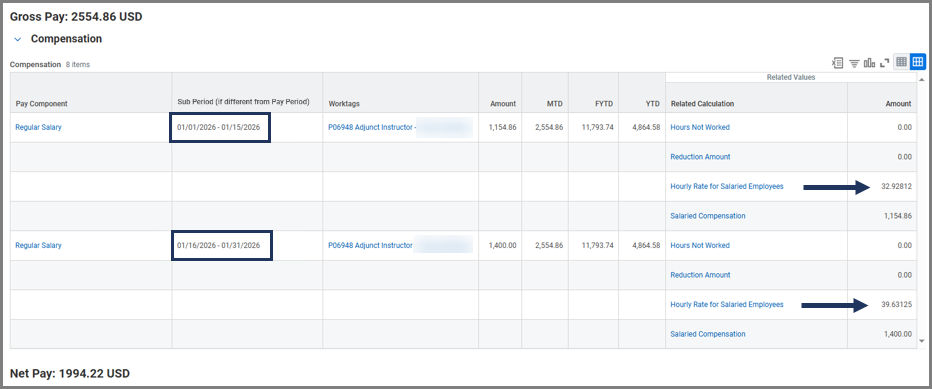
If this scenario is used, the gross pay for January will only include earnings from the new Annual Work Period. In this example, the January gross pay would be $2,500.
Scenario 3: 4.5-month Extension, New Compensation
This scenario should be used if the employee will be working through the end of the school year and have a compensation change, but is not guaranteed a full 9-month annual work period for the following school year. This scenario is commonly used for Graduate Assistants when their compensation is changing for the new semester.
| Current | New | |
| Annual Work Period | 4.5 months (9/1 – 1/15) | 4.5-month (1/16 – 5/31) |
| Monthly Compensation | $5,000/month | $7,000/month |
Action Needed
Submit Change Job with the reason Position Reclassification effective 1/16 using the AWP 4.5 months (1/16 – 5/31)
Pay Impact
Pay for the month of January will show a blended payslip using the previous compensation for the first half of the month and the new compensation for the second half of the month. This means that the amount of pay the employee from Example 1 would receive is $6000 in January since it is a blend of both compensations.
IMPORTANT: If the Graduate Assistant is going to be transferred to another System Member with the Work Period Extension, additional review will be needed. Please complete the transfer in Workday Sandbox to verify such scenarios.
Scenario 4: 9-month Extension, New Compensation
This scenario should be used if the employee will now be working a 9-month period going forward and has a compensation change.
| Current | New | |
| Annual Work Period | 4.5 months (9/1 – 1/15) | 9-month (9/1 – 5/31) |
| Monthly Compensation | $5,000/month | $7,000/month |
Action Needed
Submit Change Job with the reason Position Reclassification effective 1/16 using the AWP 9 months (9/1 – 5/31).
IMPORTANT: If 1/16 is not used as the effective date, compensation will not be accurate. A manual input might be needed to adjust the rates.
Pay Impact
When an employee’s Annual Work Period is extended to a 9-month appointment the January paycheck must be prorated based on the number of working days under each AWP. Because the working days in the month are split between the previous and new AWP, the January payslip may have a different amount of pay than a person with the same compensation change whose AWP was extended 4.5 months (Scenario 3).
We will use this scenario as if the AWP extension was happening in January of 2025.

- 1/1 – 1/15: 11 Working Days
- 1/16 – 1/31: 12 Working Days
- 23 Total Working Days
Proration Calculation
January includes time in both the previous and new AWP, so we calculate each portion separately and then add them together:
Total January Monthly Salary = Prorated Previous Compensation (1/1–1/15) + Prorated New Compensation (1/16–1/31)
| January Dates | Working Days | Compensation | Formula | Prorated Amount |
| 1/1-1/15 | 11 | $5000/month | (5000÷ 23) × 11 | 2391 |
| 1/16-1/31 | 12 | $7000/month | (7000 ÷ 23) × 12 | 3652 |
| Total | 23 | – | 2391 + 3652 | $6043 |
Benefit Impacts
If an employee’s work period is extended to 4.5 months or more with at least 50% effort, they will meet the criteria for benefits eligibility. The staffing events associated with the extension should trigger all required benefit processes.
For employees who move to a 9-month appointment, have become benefits eligible and are expected to return the following year, benefits will be bridged over the summer.
Graduate Assistants
Graduate Assistants who work 4.5 months at 50% effort are already benefits-eligible. Whether their Annual Work Period is extended using a 4.5-month or a 9-month period, their benefits eligibility will remain the same as long as they continue at 50% effort.