• Skip to primary navigation
  • Skip to main content
Workday Services
Logo, Texas A&M University System, Office of Information Technology
  • Home
  • About
    • Workday
    • Governance
    • Key Performance Indicators
  • News and Updates
    • Alerts
    • Release Notes
    • Schedules
    • Upcoming Training Events
    • Monthly User Meetings
    • Biannual Workday Releases
  • Reporting
  • Training
    • Job Aids
    • Reference Guides
    • Video Help
    • Workday Curriculum
    • About Security Roles
    • Online Courses
    • Webinars
    • Learning Hubs
    • Glossary
  • Support
    • Frequently Asked Questions
    • Common Tasks
    • Request Forms
    • Get Help
  • Office of Information Technology
    • Services
    • Contact the Office of Information Technology
    • Search OIT
Home / Job Aids / Updating 1095-C Printing Elections

Updating 1095-C Printing Elections

Print

This job aid outlines the process for an Employee or Retiree to update their 1095-C Printing Election.

Page Loading...Checking SSO..
Login with SSO to see this content.

Important Information

  • The IRS Form 1095-C includes information about insurance that an Employees and Retirees may have through The Texas A&M University System.
  • Employees and Retirees should keep their 1095-C for your records with your other important tax documents.
  • Employees and Retirees may choose to receive this form electronically or additionally have it sent  by mail.

Getting Started

  1. From the Workday Home Page, select Menu > Benefits and Pay.
    selecting the benefits and pay hub from the menu
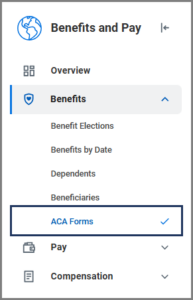
  2. On the hub menu under Benefits, select ACA Forms.benefits and pay hub menu selecting ACA forms
  3. Select Change 1095-C Printing Election.
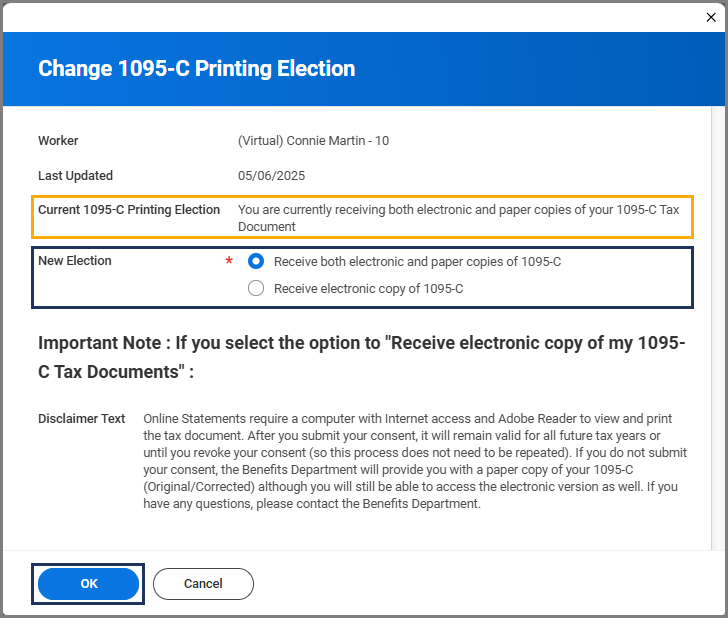
  4. On the Change 1095-C Printing Election page, the response will default to your current election.
    • If you do not want to change your election, You can decide to keep it the same by selecting Cancel.
    • If you would like to change your election, select Receive both electronic and paper copies of 1095-C or Receive electronic copy of 1095-C.
  5. Select OK and Done.

This completes the Change 1095-C Printing Election process.

Copyright © 2025 Texas A&M University System All rights reserved.

301 Tarrow Street, College Station, TX 77840 | MAP | Phone: (979) 458-7700 | email: support@tamus.edu
State of Texas | Texas Homeland Security | Texas Veterans Portal | Statewide Search | Risk, Fraud & Misconduct Hotline | Privacy | Web Accessibility | State Link Policy | Campus Carry

Texas A&M University System