
This job aid outlines the process for a non-Faculty Employee to request a Flexible Work Arrangement. The request can be submitted for working at an Alternate Work Location or using a Flexible Work Schedule. Faculty requests must be submitted via a memorandum (not in Workday) to the Department Head or Dean (as appropriate) in accordance with Standard Administrative Procedure 33.06.01.MO.02 Alternate Work Location – Faculty.
Request Flexible Work Arrangement (TAMU)
Last updated on March 14, 2026
This custom job aid is intended for TAMU, TAMUG, and TAMHSC.
Page Loading...
Checking SSO...
Prerequisites
- If you are requesting to work outside of the state of Texas, you will need to know the specific address of the alternate work location (AWL). Requests for out-of-state AWLs will be evaluated on a case-by-case basis and will require written approval prior to the Employee working outside of the state. Out-of-state AWL requests for employees in academic units will require approval from the Provost while requests for non-academic (division) units will require approval from the Chief Operating Officer.
- Please use the respective memorandum templates to route your out-of-state AWL requests for consideration—academic unit template or divisions template. To expedite your request, memos should be sent via email to the Vice President of Human Resources and Organizational Effectiveness at [email protected].
- You must be in a position that qualifies for flexible work arrangements (FWA). FWA information and resources are available online.
- International Alternate Work Location (IAWL) requests for staff (as well as faculty and graduate assistants) must follow Standard Administrative Procedure 33.06.01.M0.03 International Alternate Work Locations and be routed for approval using the International Alternate Work Location (IAWL) Request Form. Staff must attach their approved IAWL to their Flexible Work Arrangement request in Workday.
Important Information
- The request must comply with System Regulation 33.06.01 Flexible Work Arrangements, member rules and/or 33.06.01.M0.01: Alternate Work Locations. All parties should consult member rules, standard administrative procedures or guidance on justification, attachments or other information to support the approval process.
- There are two types of Flexible Work Arrangements:
- Alternate Work Location. Use this type when you would like to request remote work, either partially or fully remote.
- Flexible Work Schedule. Use this type when you would like to request adjusted hours and days that differ from your original schedule.
- Do not use this process to request reasonable accommodation under the Americans with Disabilities Amendment Act. Reasonable accommodation requests must follow the reasonable accommodation process and be submitted outside of Workday through Employee Relations ([email protected] or (979) 862-4027).
- You and your Manager will receive an email notification when the Flexible Work Arrangement is approved.
- AWL arrangements must be evaluated at least annually (each fiscal year) by the Manager and the Employee to determine if continuation of the AWL is mutually beneficial to both the employer and the Employee.
- Workday sends notifications regarding the expiration of Flexible Work Arrangements as follows: Flexible Work Arrangements Expiring (Worker) (expires in 30 days), Flexible Work Arrangements Expiring (Manager) (expires in 30 days), Flexible Work Arrangement Expired 7 Days Ago (Worker), and Flexible Work Arrangement Expired 7 Days Ago (Manager).
Getting Started
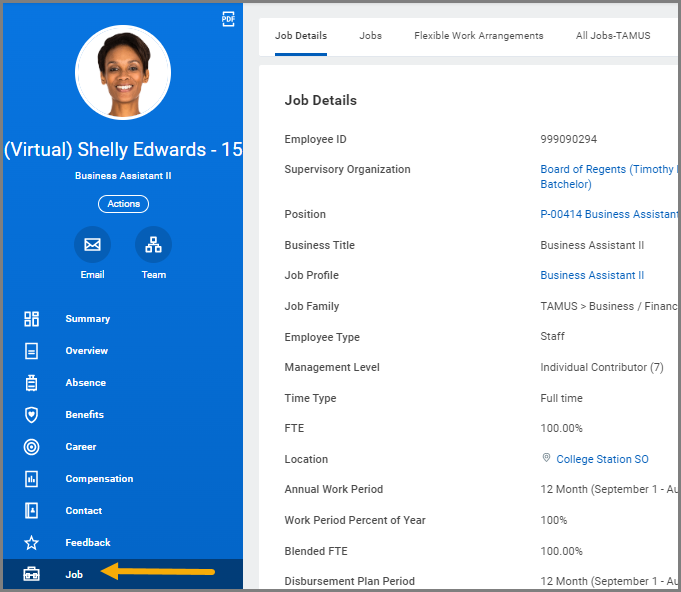
- Navigate to your Worker Profile and select Job on the left hand navigation panel.
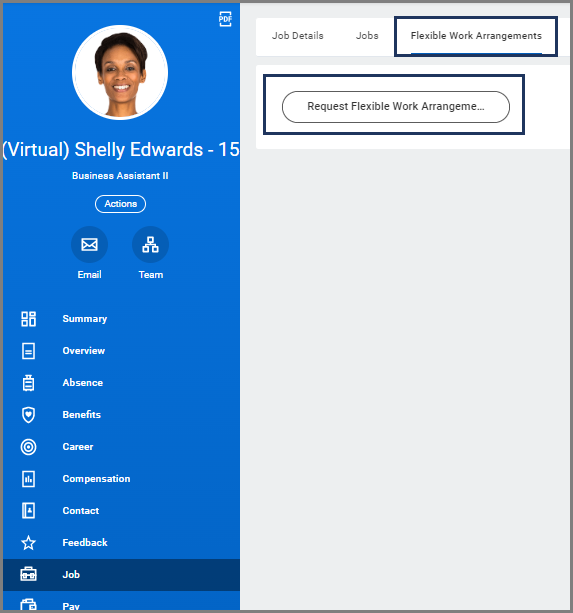
- Select the Flexible Work Arrangement tab and select the Request Flexible Work Arrangement button.
- Read the instructional text and certification statements at the top of the screen prior to completing the seven required fields below.
- Start Date. The start date will automatically default to the date the request is initiated. Enter the date that the Flexible Work Arrangement will begin.
- Proposed End Date. The Proposed End Date can be no more than 12 months in the future. Enter the end date of your Flexible Work Arrangement.
- Type. There are three Flexible Work Arrangement types available.
- Alternate Work Location. Select Fully Remote (if you will be completely out of the office) or Partially Remote (if you plan to work a hybrid schedule).
- Flexible Work Schedule. Use this type when you would like to request adjusted hours and days that differ from your original schedule. Then use the comments box to provide details of your proposed Flexible Work Schedule for each day of the week you selected. You may provide details of your proposed Flexible Work Schedule as an attachment.
- Workplace Accommodations. Do not use this process to request reasonable accommodation under the Americans with Disabilities Amendment Act. Reasonable accommodation requests must follow the reasonable accommodation process and be submitted outside of Workday through Employee Relations ([email protected] or (979) 862-4027).
- Hours Per Week. Enter the number of hours being worked outside the normal expected schedule or the number of hours you will work at the Alternate Work Location.
- Days per Week. Enter the number of days per week you will need for the Flexible Work Arrangement.
- Days of the Week. Select the days of the week that will apply for this arrangement.
- Comments. Comments are required to provide justification, details and information to support the request.

Important: Please review the content in all attachments to be sure they do not contain medical related information. If the Alternate Work Location will be outside of the United States you must attach the approved International Alternate Work Location request (see Prerequisites). Departments may require additional forms or approvals that need to be attached.
- Select Submit
Note: After submitting your Flexible Work Arrangement request, you will receive a review step.
Navigate to the Up Next tab for the next steps in the process.
Up Next
This section only applies to Alternate Work Location Requests. The three upcoming tasks below will only route to you when your flexible work arrangement request is for an Alternate Work Location.
Review Documents for Request Flexible Work Arrangement
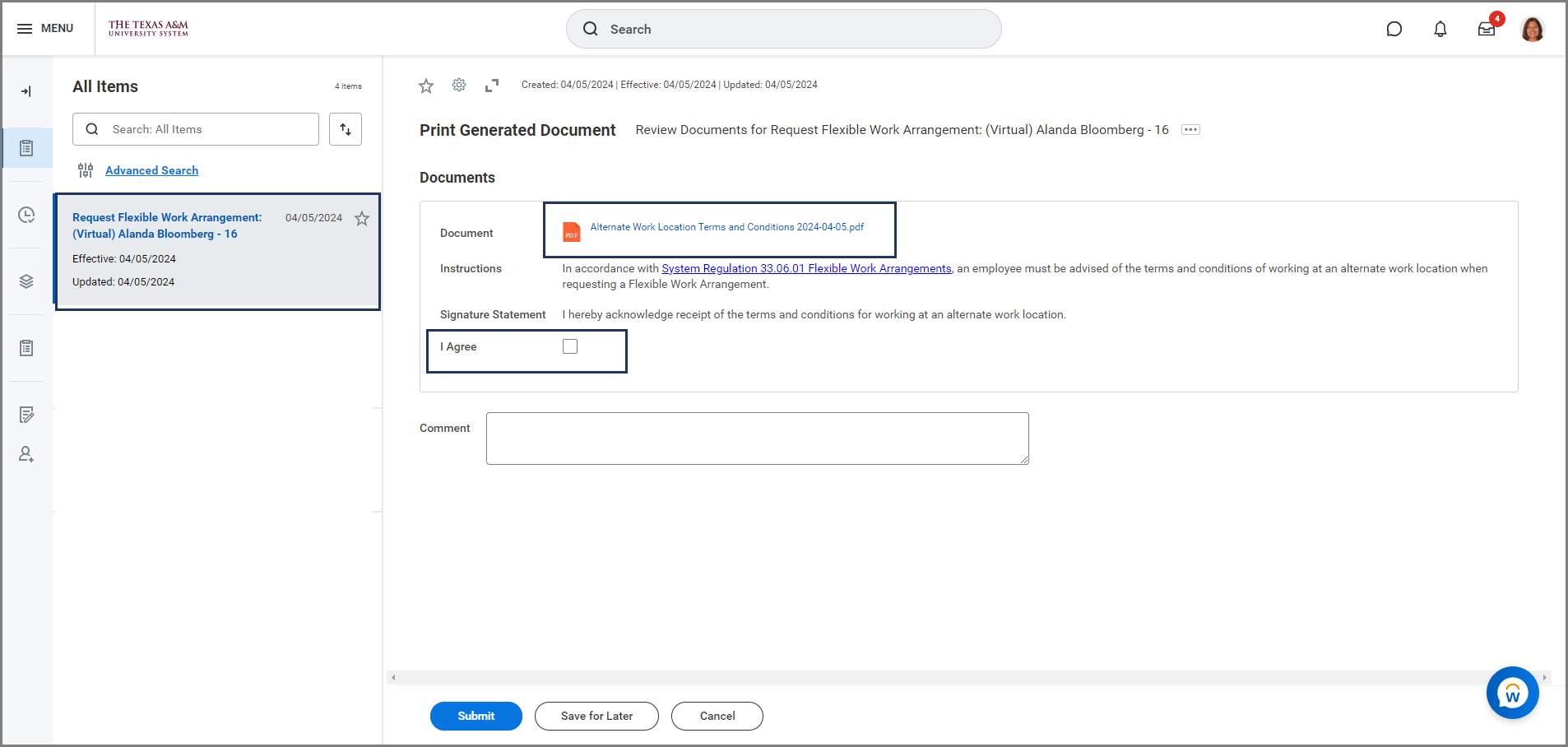
You will receive the To Do: Request Flexible Work Arrangement. This task will require you to review the document Alternate Work Location Terms and Conditions.
- Navigate to your Workday Inbox and select the Request Flexible Work Arrangement To Do.
- Review the Alternate Work Location Terms and Conditions Document and instructions.
- Select the I Agree checkbox.
- Enter any comments as needed and select Submit.
- Once submitted, you will need to refresh the inbox to receive the next task.
Complete Questionnaire
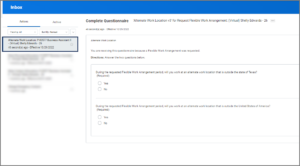
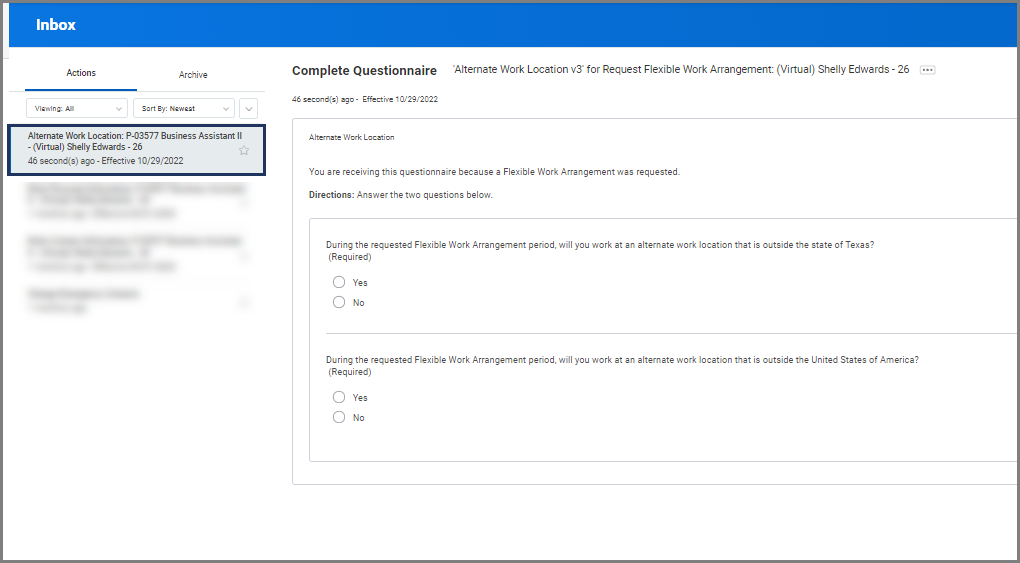
Next, you will receive a questionnaire in the To Do: Alternate Work Location. The questionnaire is about your Alternate Work Location. You will need to specify if your Alternate Work Location will be outside the state of Texas or outside the United States of America.
Reminder: International Alternate Work Location (IAWL) requests for staff (as well as faculty and graduate assistants) must follow Standard Administrative Procedure 33.06.01.M0.03 International Alternate Work Locations and be routed for approval using the International Alternate Work Location (IAWL) Request Form. Staff must attach their approved IAWL to their Flexible Work Arrangement request in Workday.
- Select the To Do Alternate Work Location for Request Flexible Work Arrangement and complete the questionnaire.
- Select Submit.
- Once submitted, you will need to refresh the inbox to receive the next task.
Update Your Work Contact Information
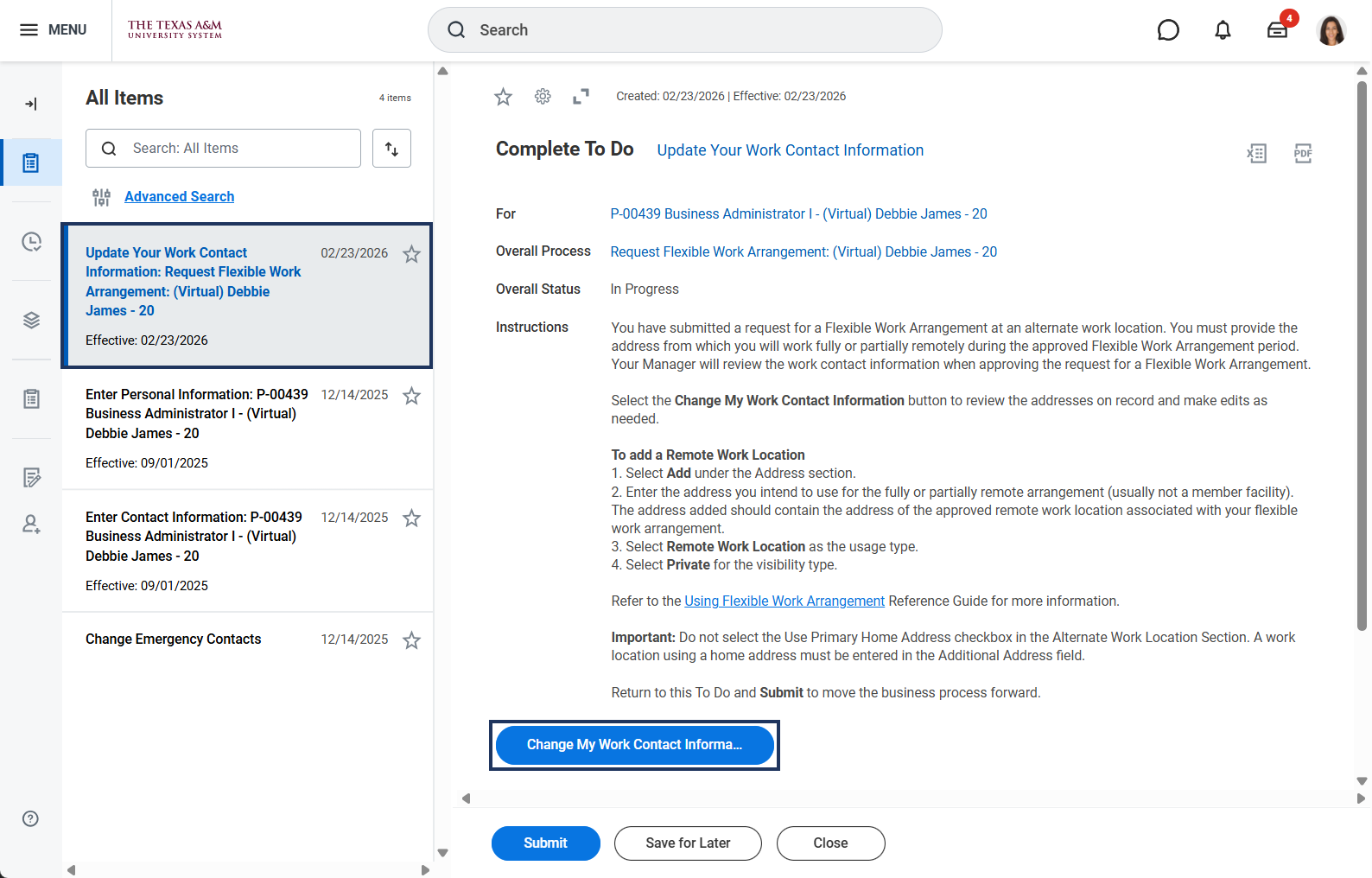
Finally you will receive the To Do: Update Your Work Contact Information.
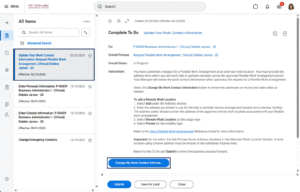
- Navigate to your Workday inbox and select the To Do Update Your Work Contact Information.
- Select the blue Change My Work Contact Information button. The button will take you to a page to update your work contact information, but you must return to your inbox to submit the To Do after you have completed the Change My Work Contact Information task. Do not initiate a stand-alone Change Work My Contact Information task.
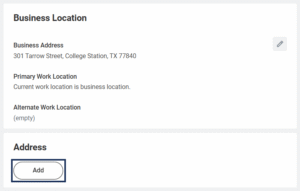
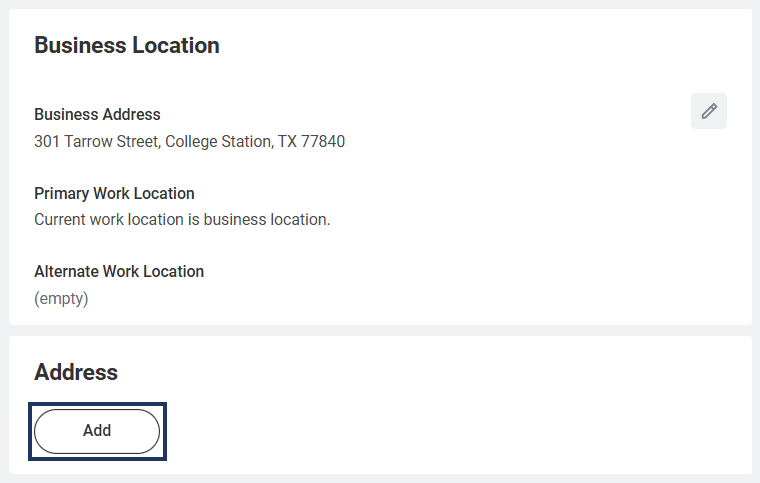
- On the Change My Work Contact Information page, select Add in the Address section.
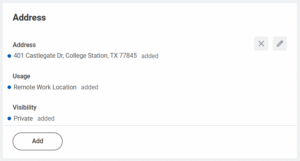
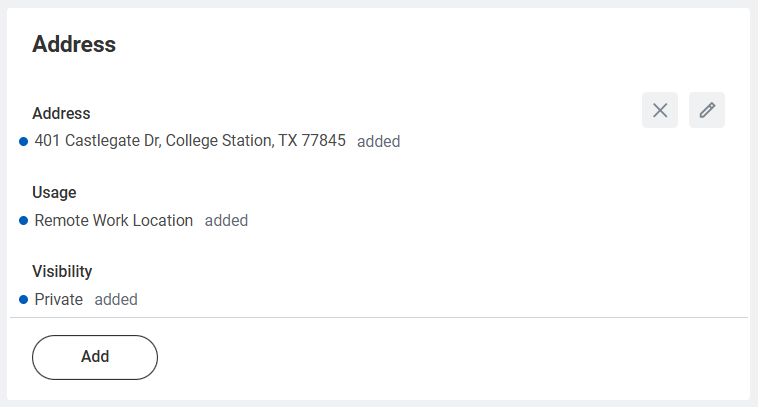
- Enter the appropriate information to add the Remote Work Location, usually not a member facility. Additional information about some fields is provided below.
- Address Line 2. Optional. Use this field for an apartment, building, or suite number associated with Address Line 1.
- Usage. Select Remote Work Location.
- Visibility. Select Private.
- After updating your contact information, select Submit and return to your inbox to submit the To Do.
- Enter any comments as needed.
- Select Submit.
Additional Routing
The request will be routed to the Manager, Department Head, Executive Approver, and Chief Executive Approver (only for AWL requests) for approval.
Note: AWL requests will also route to the Export Control Partner (if for international request) and/or Faculty Partner (if Faculty). Faculty requests must be submitted via a memorandum (not in Workday) to the Department Head or Dean (as appropriate) in accordance with Standard Administrative Procedure 33.06.01.M0.02 Alternate Work Location – Faculty.
This completes the Request Flexible Work Arrangement business process.