
• Skip to primary navigation
  • Skip to main content
  • Skip to primary sidebar
Workday Services
Logo, Texas A&M University System, Office of Information Technology
  • Home
  • About
    • Workday
    • Governance
    • Key Performance Indicators
  • News and Updates
    • Alerts
    • Release Notes
    • Schedules
    • Upcoming Training Events
    • Monthly User Meetings
    • Biannual Workday Releases
  • Reporting
  • Training
    • Job Aids
    • Reference Guides
    • Video Help
    • Workday Curriculum
    • About Security Roles
    • Online Courses
    • Webinars
    • Learning Hubs
    • Glossary
  • Support
    • Frequently Asked Questions
    • Common Tasks
    • Request Forms
    • Get Help
  • Office of Information Technology
    • Services
    • Contact the Office of Information Technology
    • Search OIT
Home / FAQs / How do I review the employee’s responsibilities as part of the review?

How do I review the employee’s responsibilities as part of the review?

You can use the Review Analytics button at the bottom of the navigation bar on the left side of the screen.
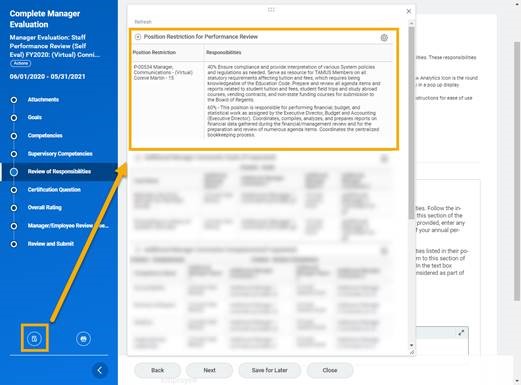
Review Analytics button selction for revieiwng employee's responsibilities

Or you can navigate to the employee’s position restrictions and view the responsibilities on the qualifications tab.

Primary Sidebar

Support

  • Frequently Asked Questions
  • Common Tasks
  • Request Forms
  • Get Help

Copyright © 2026 Texas A&M University System All rights reserved.

301 Tarrow Street, College Station, TX 77840 | MAP | Phone: (979) 458-7700 | email: support@tamus.edu
State of Texas | Texas Homeland Security | Texas Veterans Portal | Statewide Search | Risk, Fraud & Misconduct Hotline | Privacy | Web Accessibility | State Link Policy | Campus Carry

Texas A&M University System