
Roster
The Roster sub-tab provides a list of employees registered for the selected section.
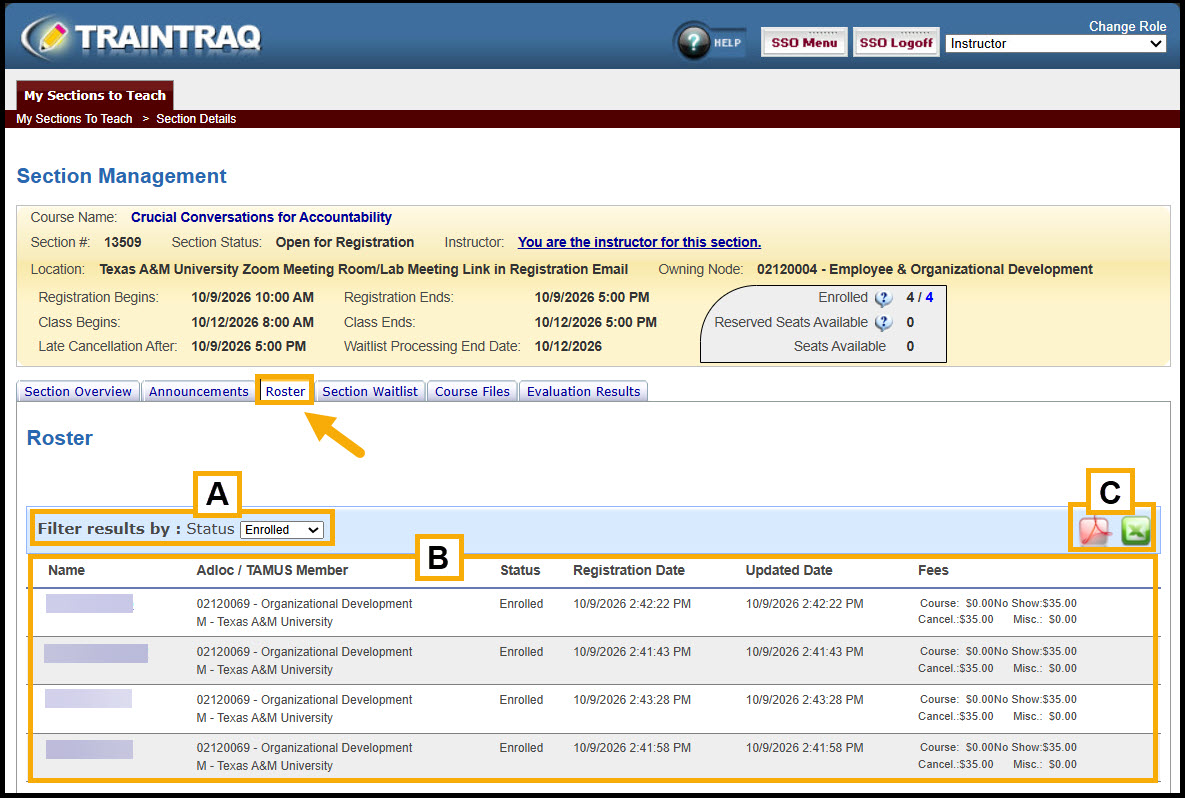
From the Roster sub-tab, you may view the list of employees who have registered for the section.
- The roster may be filtered by the student statuses of Enrolled, Cancelled, Completed, Incomplete, No Show, or All.
- Enrolled: Displays list of employees currently enrolled in the section.
- Cancelled: Displays list of previously enrolled employees who have been dropped from the section.
- Completed: Displays list of employees whose attendance has been marked as completed.
- Incomplete: Displays list of employees whose attendance has been marked as incomplete.
- No Show: Displays list of enrolled employees who were marked No Show.
- All: Displays a list of all employees in all statuses for the section.
- The roster will display with the employee’s Name, Adloc, TAMUS Member, Status, Registration Date, Updated Date, and Fees.
- To print the roster, click either the red Adobe Acrobat A icon for a PDF version or the green Microsoft Excel X icon for an Excel Version.
- The PDF version is designed for use as a sign-in sheet for attendees.
- The Excel version provides additional information that is not included in the PDF version, such as the employee’s email address and phone number as well as their supervisor’s name and email address.
Section attendance is also recorded from the Roster tab, but the controls to do so don’t appear until after the section is scheduled to end. To learn more about marking attendance for your section, view the Marking Attendance page.