
My Section to Teach Tab
The My Sections to Teach tab provides a list of past, current, and future sections for which you are or were listed as the instructor. From this screen, you can view details about your scheduled sections.
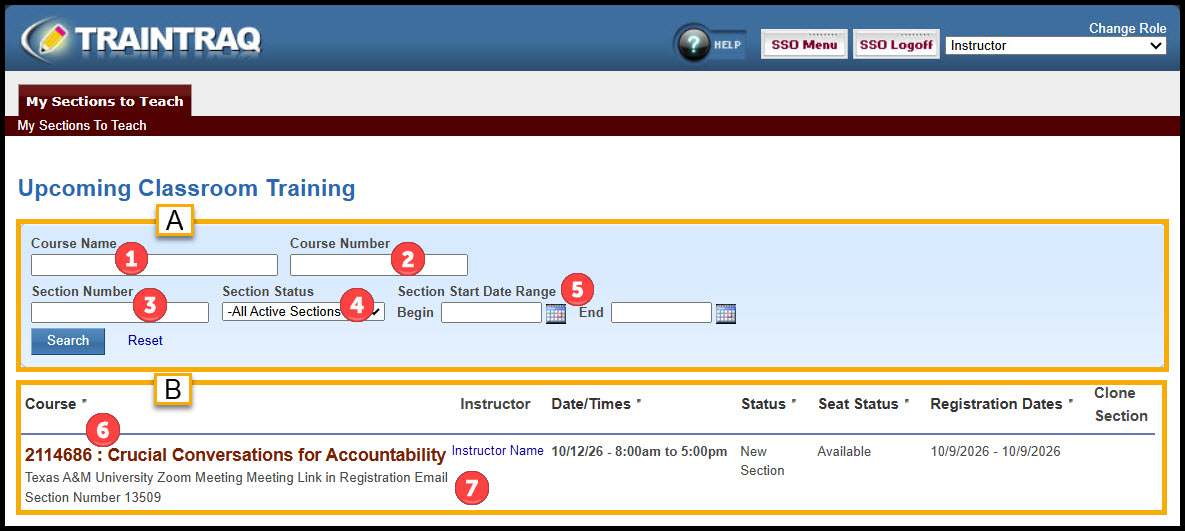
The My Sections to Teach tab is divided into two sections:
- The top portion of the screen provides search fields to filter the sections listed in the lower portion of the screen. Searches may be conducted using none, any, or all of the available search fields. The search fields include:
- The Course Name field allows entry of a partial or complete course name.
- The Course Number field allows entry of the course number.
- The Section Number field allows entry of the section number.
- The Section Status drop-down menu provides a list of section statuses that may be searched.
- The Section Start Date Range fields allow entry of a date range to search for sections offered during a specific time period.
- Below the Search area, Course and Section details are shown.
- Course details include Course Number and Course Name.
- Section details shown include Class Location, Section Number, Instructor, Section Date/Times, Section Status, Seat Status, and Registration Dates.
To access the Section Management screen for a section, click the Course Name.