• Skip to primary navigation
  • Skip to main content
TrainTraq Help
Logo, Texas A&M University System, Office of Information Technology
  • Home
  • Employees
  • Managers
  • Processors
  • Registrars
  • Administrators
  • FAQs
  • News
  • Office of Information Technology
    • Services
    • Contact the Office of Information Technology
    • Search OIT
Home / Workstation & Departmental Processor Role Topics / The Difference between Standard and Excel Layouts

The Difference between Standard and Excel Layouts

Some of the reports in TrainTraq come in two formats: a standard (not Excel) layout and Excel Layout. For example, see the screenshot of the Report menu below.
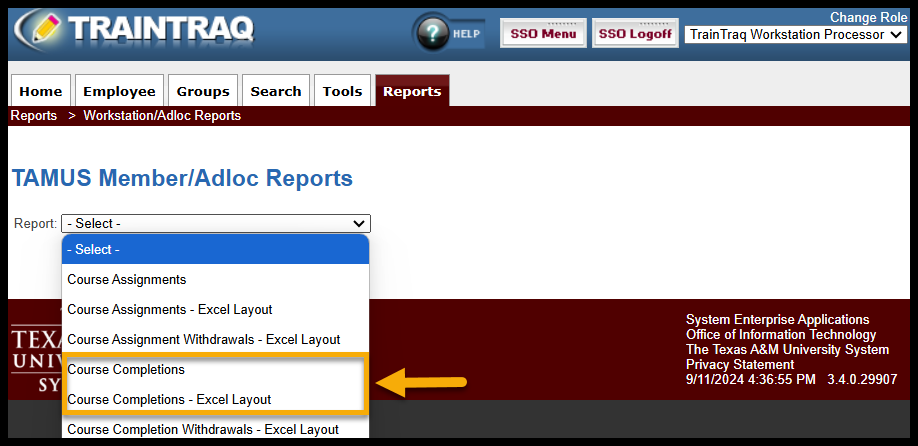
The primary difference is that the standard layout prints better, and the Excel layout includes more employee information and is more useful if you need to sort the data. See screenshots below.
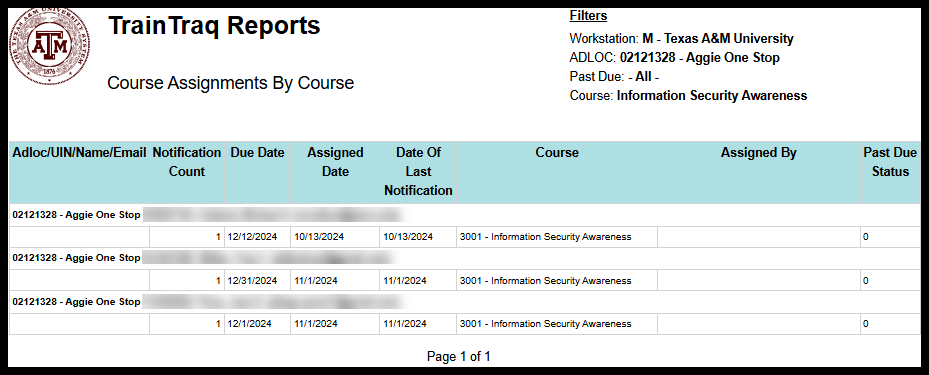
Example of Standard layout for Course Assignments by Course report.
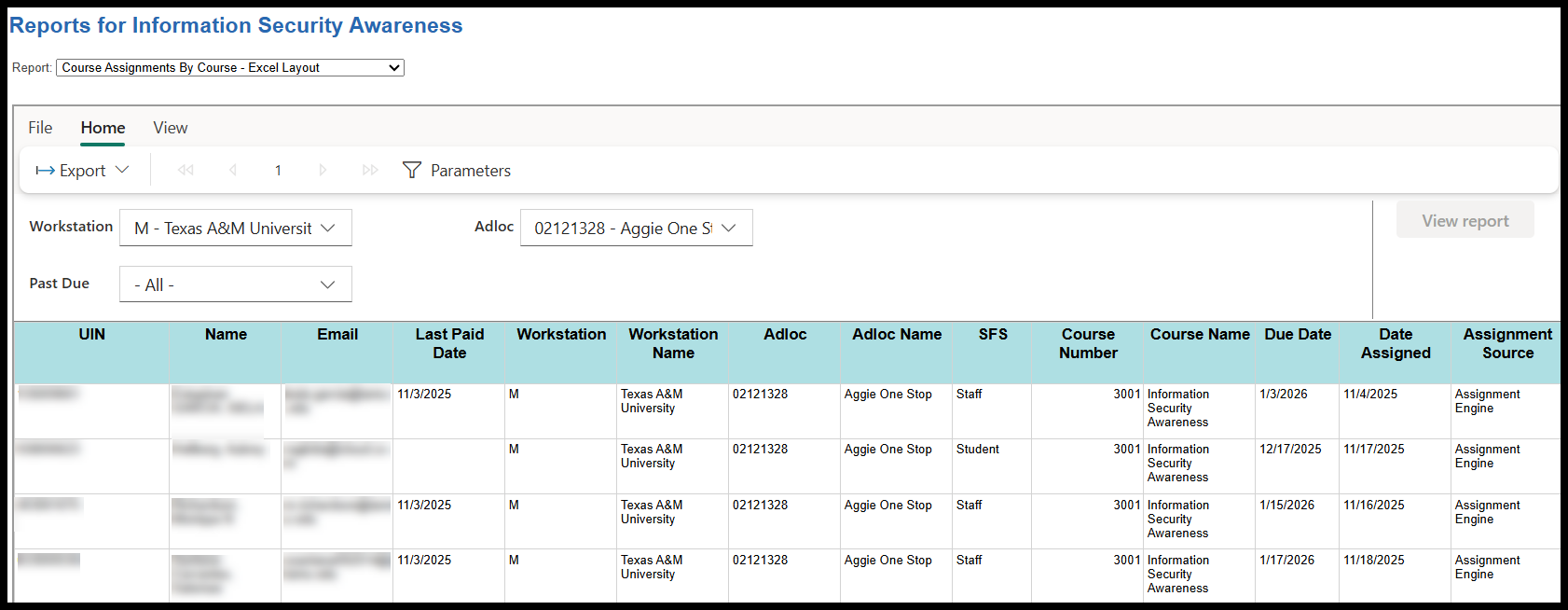
Example of Excel layout for Course Assignments by Course Report.

Below is a detailed summary of the differences between the two layouts.

Standard Layouts VS. Excel Layouts
  • Pre-formatted to be one page wide.
  • Displays less information than the Excel format, including:
    • Adloc
    • UIN
    • Name
    • Email
    • Course Name
    • Due Date
    • Date Assigned
    • Assigned By
    • Number of Notifications
    • Date of Last Notification
    • Past Due Status
  • Includes a formal report header with the TAMU System seal, report type, and a list of filters selected for the report parameters.
  • Organized by UIN, with one main entry for each UIN and the course assignments/completions listed all together underneath the entry.
  • Not pre-formatted to be one page wide.
  • Displays more information than the Standard format, including:
    • UIN
    • Name
    • Email
    • Last Paid Date
    • Workstation
    • Workstation Name
    • Adloc
    • Adloc Name
    • SFS (states whether the employee is a Student, Faculty, or Staff)
    • Course Number
    • Course Name
    • Due Date
    • Date Assigned
    • Assignment Source
    • Assigned By
    • Assigned By Name
    • Primary Supervisor Name
    • Primary Supervisor Email
    • Number of Notifications
    • Date of Last Notification

NOTE: The above list of information is not an exhaustive list of what each Excel Layout report displays. The specific information displayed varies depending on the type of report i.e. withdrawal reports have fields about withdrawal range dates and additional withdrawal information.

  • Does not include a formal report header with the TAMU System seal and other info found in the header of the standard layout.
  • Lists out separate entries for each course assignment/completion.


Copyright © 2026 Texas A&M University System All rights reserved.

301 Tarrow Street, College Station, TX 77840 | MAP | Phone: (979) 458-7700 | email: support@tamus.edu
State of Texas | Texas Homeland Security | Texas Veterans Portal | Statewide Search | Risk, Fraud & Misconduct Hotline | Privacy | Web Accessibility | State Link Policy | Campus Carry

Texas A&M University System