
• Skip to primary navigation
  • Skip to main content
  • Skip to primary sidebar
Single Sign On Help
Logo, Texas A&M University System, Office of Information Technology
  • Home
  • Getting Started
  • Roles
  • Key Concepts
  • Security
  • FAQs
  • SSO News
    • Release Notes
  • Governance
  • Office of Information Technology
    • Services
    • Contact the Office of Information Technology
    • Search OIT
Home / Help System / Key Concepts / Administrator Navigation / Exclusion List

Exclusion List

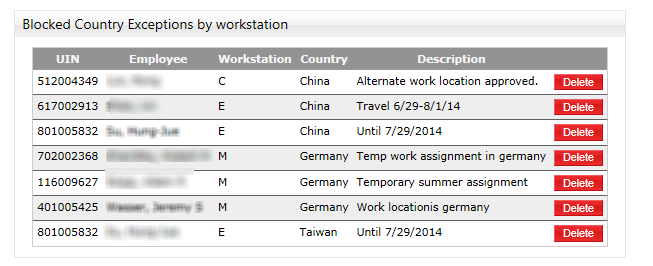
This page lists the employees that currently have blocked country exclusions.  The SSO Central Admin will only see the employees for which they have access to.  The list includes any notes or description about the exclusion.

The ‘Delete’ button will remove the exclusion for the employee and they will once again be blocked from accessing SSO from an IP address in that country.
exclusion_list

Primary Sidebar

Contact

Find Your Support For SSO

Related Topics

  • Status
  • Admins/Menus
  • Log
  • Roles
  • Managers
  • Manager’s Employees
  • Foreign Access
  • Employee List
  • Reports
  • Application List
  • Set Alert Message
  • Import Affiliate UIN List

Copyright © 2026 Texas A&M University System All rights reserved.

301 Tarrow Street, College Station, TX 77840 | MAP | Phone: (979) 458-7700 | email: support@tamus.edu
State of Texas | Texas Homeland Security | Texas Veterans Portal | Statewide Search | Risk, Fraud & Misconduct Hotline | Privacy | Web Accessibility | State Link Policy | Campus Carry

Texas A&M University System