
Using ID.me
ID.me is an identity verification service trusted by many federal and state agencies, including the Social Security Administration, Medicare, the IRS, and The Texas A&M University System. To learn more, watch a short video about ID.me.
See ID.me Frequently Asked Questions for more information.
How you use ID.me depends on your relationship with the A&M System.
New Hires, Retirees, and Former Employees
Starting November 1st, 2026, pre-hire personnel, retirees, and former employees will no longer use SSO’s UIN Login. Instead, these users will be required to use ID.me for authentication with SSO.
Anyone who already has a valid A&M System credential can use that login; e.g., new student workers and certain retirees.
New to ID.me?
You must have a verified account to use ID.me. First, review ID.me’s list of required documents. Then, see SSO’s Creating an ID.me account page to get started. If you need help, visit the Getting Help page.
Select the ID.me logo from the Single Sign On (SSO) login page.

The following screen will ask for your Universal Identification Number (UIN) to verify your eligibility to use the ID.me login:
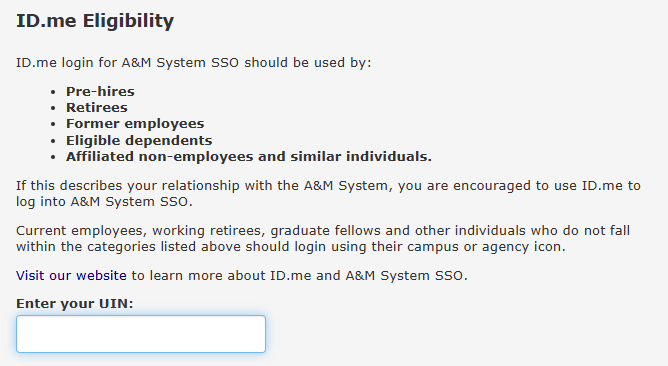
If you are eligible to use ID.me, you will be redirected to the ID.me site to log in.
If you already have an ID.me account, use your existing username and password to log in.
Otherwise, create an ID.me account and verify your identity with them.
After logging into ID.me for the first time, you will authorize A&M System to access your verified identity information. Clicking “Deny” will prevent you from logging in to SSO with your ID.me account.
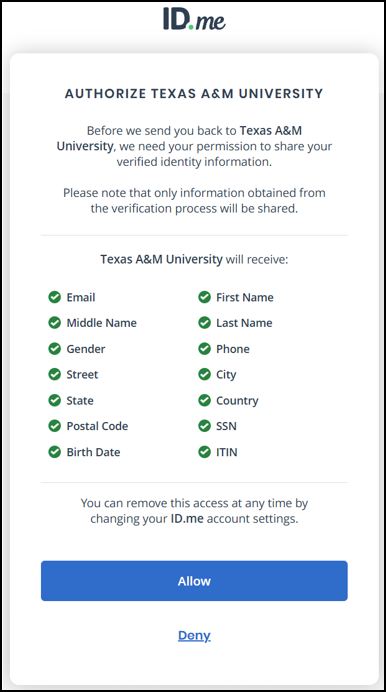
Creating your ID.me account is easy. You can do it entirely on your own, without assistance from your A&M System HR or benefits representative. View ID.me’s step-by-step instructions or view a step-by-step video.
NOTE: Your ID.me account belongs to you and it is independent of your relationship with the A&M System. You can use it with other entities such as the Social Security Administration, Medicare, and the Internal Revenue Service.
What you need to create your ID.me account:
- A smartphone, tablet, or computer with a camera
- Photo ID (U.S. driver’s license or state ID, U.S. passport, or U.S. passport card)
- An official government identification number:
Please note that the information you provide ID.me must match your legal name, social security number, and birth date in Workday. Contact your Human Resources department if a Workday change is needed.
To create your account:
- Click the ID.me link in SSO
- Verify your UIN
- Follow ID.me’s instructions to create your account using:
- Set up multi-factor authentication on your ID.me account
Refer to our Getting Help page if you need help creating your account.
An excellent resource is the Social Security Administration’s video about the ID.me account setup process.
For help with with ID.me, please consult the following links.
- ID.me frequently asked questions
- ID.me required documents
- ID.me account creation step-by-step guide
- ID.me identity verification guides using:
- Using a video call with ID.me
- Troubleshooting ID.me issues
- ID.me issues: Contact TAMU Help Desk Central
- 979-845-8300 (available 8:00 AM to Midnight)
- [email protected]
- Single Sign On issues: Contact A&M System Support
Current Employees
Active employees of the A&M System should use their university/agency credentials (alternate login) rather than ID.me.
Affiliate Users
Affiliates of A&M System members can use ID.me to log in to SSO only if they have a Workday Contingent Worker account.
All other affiliates should use the university/agency credential (alternate login) provided by the institution rather than ID.me. This includes contractors, students, and other individuals who work with the A&M System but do not have a Workday account.
Department and Central Administrators
SSO department and central administrators can help new employees, retirees, and former employees learn to use ID.me effectively.