
To request a new earning code, you must first be an authorized user of the Earning Codes database in the Requester role. See User Setup for more information.
Requesters can create a new earning code in the Earning Codes database, and submit the new record for approval. If the status is New, click on Request Earning Code Approval link in the Approvals section of the form (screenshot below). This will complete the submission, and update the status to Pending Approval.
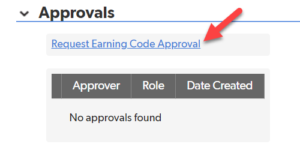
More details about how to request a new earning code.
Once an earning code is submitted for approval, it is reviewed by 3 approval groups:
- Workday Services, which adds several payroll-related fields to the request
- System Budgets and Accounting (SOBA), which adds the financial systems’ object codes to the request
- System Enterprise Applications (SEA), which sets the effective from/thru dates and performs the final approval
After these groups have reviewed the request and added the needed payroll and accounting detail information, an earning code administrator will activate the new earning code.
The Earning Codes application will email Workday Services, FAMIS, and the Enterprise Data Warehouse group upon activation and they will update their earning codes data accordingly.