
New Users
Payroll managers, financial officers, and IT personnel from TAMUS OIT must be set up as users of the Earning Codes database in order to request and approve earning codes.
Email [email protected] to initiate the process. You must provide your UIN and the requested role in this email. Those are:
- Requester
- Workday Services Approver
- SOBA Approver
- SEA Approver
When your role is granted, you will receive an invitation to join the QuickBase platform as a user and another to accept your role in the Earning Codes database.
Administration
New users of the Earning Codes app must first be set up in QuickBase. This should be done using the employee’s work email address as displayed in SSO.
Next, the new user must be granted his/her role in the application.
Finally, the new user must be added to the appropriate Google Group for email distribution:
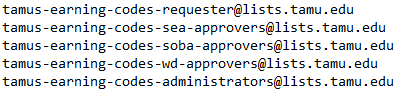
These groups are managed in the TAMU Google Groups portal: https://groups.google.com/a/tamu.edu/forum/#!myforums
Note that this portal requires your TAMU NetID as a logon credential.