
• Skip to primary navigation
  • Skip to main content
  • Skip to primary sidebar
Single Sign On Help
Logo, Texas A&M University System, Office of Information Technology
  • Home
  • Getting Started
  • Roles
  • Key Concepts
  • Security
  • FAQs
  • SSO News
    • Release Notes
  • Governance
  • Office of Information Technology
    • Services
    • Contact the Office of Information Technology
    • Search OIT
Home / Help System / Key Concepts / Administrator Navigation / Reports / Admin Roles By Workstation

Admin Roles By Workstation

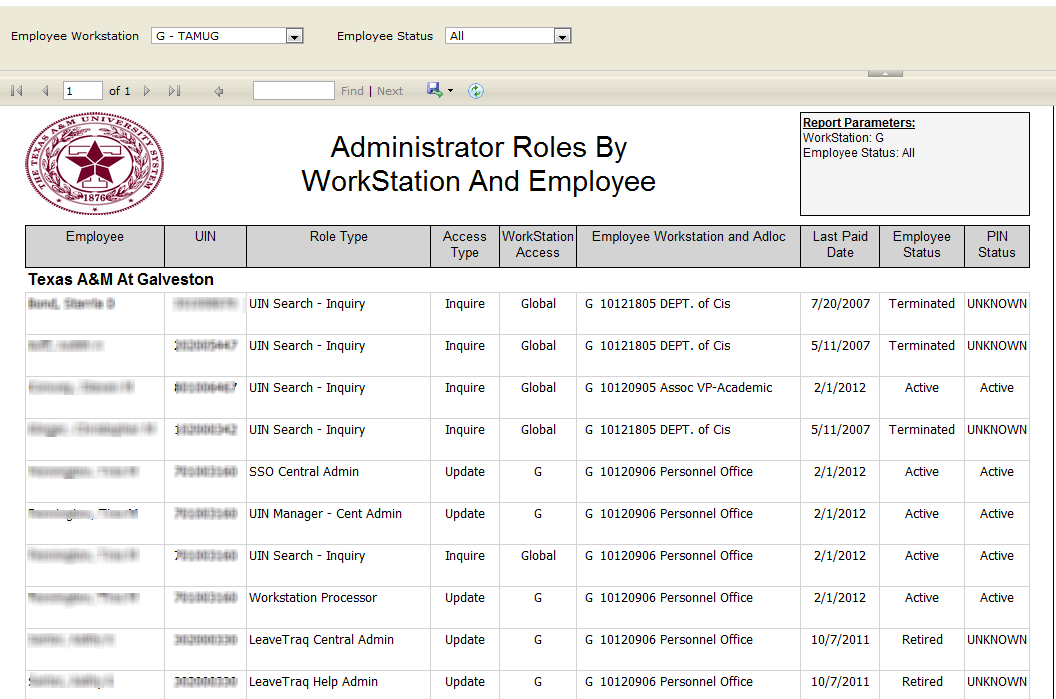
The ‘Admin Roles By Workstation’ report is available to the Central Admin role. It requires the parameters Employee Workstation and Employee Status.

This report lists employees of a specified Workstation that have Workstation or Higher Administrative Roles in SSO Applications.
adminroles

Primary Sidebar

Contact

Find Your Support For SSO

Related Topics

  • Managers By Employee Type
  • Employees With SSO Roles
  • Roles By Application
  • Employee’s Managers List
  • Employee Monthly Position Changes

Copyright © 2026 Texas A&M University System All rights reserved.

301 Tarrow Street, College Station, TX 77840 | MAP | Phone: (979) 458-7700 | email: support@tamus.edu
State of Texas | Statewide Search | Texas Homeland Security | Texas Veterans Portal | State Link Policy | State Auditor’s Office Fraud, Waste or Abuse Hotline | Compact with Texans | Campus Carry | Report Risk, Fraud & Misconduct | Privacy | Open Records | Linking Policy | Fraud Policy | Digital Accessibility | Accommodations

Texas A&M University System