
Contact Types are created by the SSO System Admin role and the contact data is managed by the Contact Admin in SSO. To access the Contact Type List, log in to SSO then click the Contact Admin button in the upper right of the SSO Menu.
Contact Type List Tab
The ‘Contact Type List’ tab lists the contact types available for update.
To see only contact types associated with a specific application, use the Application drop down to filter the list by Application. Similarly, if you know the name of the contact type you would like to see, type the name into the Contact Type search box and click Search.
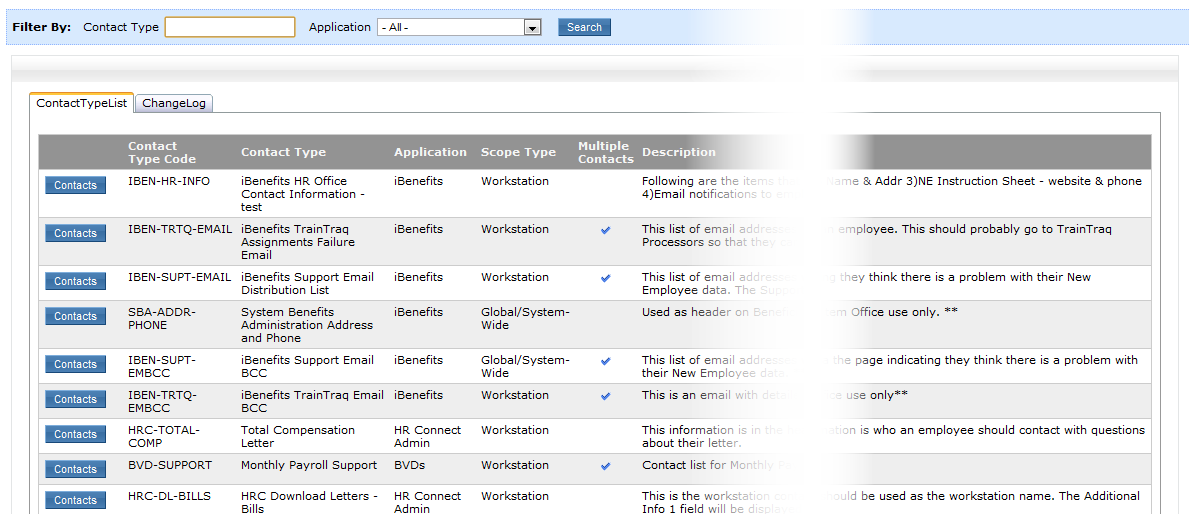
The Contact Type List displays details about each contact type. Below is an explanation of each column:
- Contact Type Code – the code used internally by the consuming application or system to access the data for the contact type
- Contact Type – name of the contact type
- Application – the name of the application that is consuming the contact data for that contact type
- Description – brief description how the application is using the data in that contact type
Change Log Tab
The Change Log tab lists the changes made to the contact types starting with the date listed in the “Show log in descending order starting from” text box.
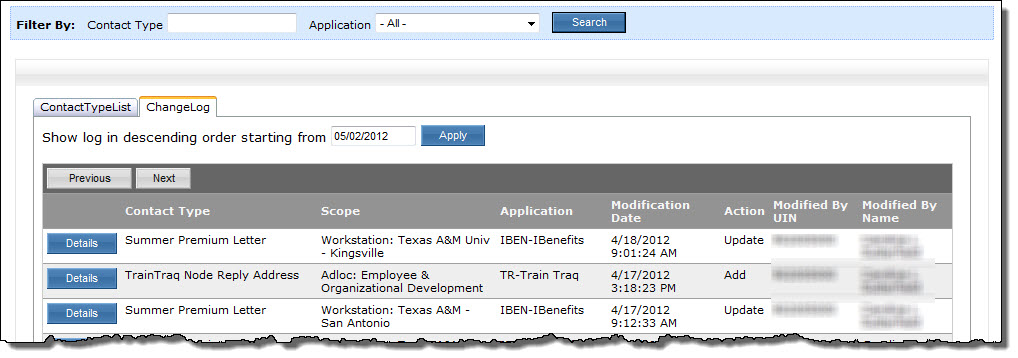
Click the Details button to show the values of each field in the contact data at the time of the update. The details also include when the update was made, which UIN made the change, the role the UIN was using to make the change, and what type of action the update was (Add, Update, Delete).
For information about editing the contact data, see the section Edit Contact Data.