
• Skip to primary navigation
  • Skip to main content
  • Skip to primary sidebar
HRConnect Help
Logo, Texas A&M University System, Office of Information Technology
  • Home
  • Getting Started
  • Employees
  • Central Admins
  • FAQ
  • Contacts
  • Office of Information Technology
    • Services
    • Contact the Office of Information Technology
    • Search OIT
Home / Help System Overview / Key Concepts / Key Concepts for Employees / Financial Calculators / Savings Calculator

Savings Calculator

The Savings Calculator allows you to do a simple forecast on the value of a savings account, given several variables you supply:
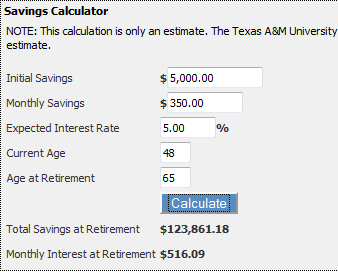
hrc2-savings-calculator

To make a change, simply alter the Gross Pay amount and click the Calculate button.

To learn more about a particular payroll value or variable amount, click the Help icon in question.

Primary Sidebar

Related Topics

  • Annuity Calculator
  • Savings Calculator

Copyright © 2026 Texas A&M University System All rights reserved.

301 Tarrow Street, College Station, TX 77840 | MAP | Phone: (979) 458-7700 | email: support@tamus.edu
State of Texas | Statewide Search | Texas Homeland Security | Texas Veterans Portal | State Link Policy | State Auditor’s Office Fraud, Waste or Abuse Hotline | Compact with Texans | Campus Carry | Report Risk, Fraud & Misconduct | Privacy | Open Records | Linking Policy | Fraud Policy | Digital Accessibility | Accommodations

Texas A&M University System