
• Skip to primary navigation
  • Skip to main content
  • Skip to primary sidebar
HRConnect Help
Logo, Texas A&M University System, Office of Information Technology
  • Home
  • Getting Started
  • Employees
  • Central Admins
  • FAQ
  • Contacts
  • Office of Information Technology
    • Services
    • Contact the Office of Information Technology
    • Search OIT
Home / Release Notes / April 20th, 2017 Direct Deposit Hot Fix

April 20th, 2017 Direct Deposit Hot Fix

On April 20th, 2017, a hot fix was made to HRConnect to better protect employees’ direct deposit information.  Before changing your direct deposit information, your identity will be further challenged by asking you to provide and verify your current payroll bank account number:
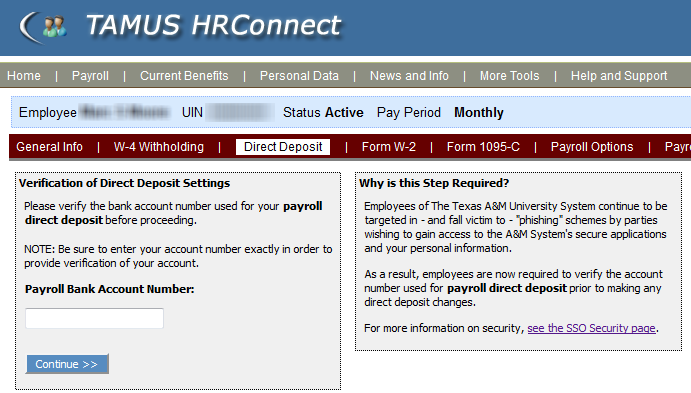
Once you have passed the elevated identity check, you will be given access to HRConnect’s Direct Deposit screens.

This change is the result of phishing attacks perpetrated against System employees and is intended to enhance the security of all employees’ bank account and payroll information while having minimal impact to our user community.

Please be aware of this change and have the required information available when you want to update your direct deposit settings.

Note that it is recommended that you enable two-factor authentication on your SSO account and on accounts you may have with other identity providers as an additional security measure.

Primary Sidebar

Related Topics

  • HRConnect Help Home
  • Search
  • Help System Overview
  • Frequently Asked Questions
  • Frequently Asked Administrative Questions
  • What’s New

Copyright © 2026 Texas A&M University System All rights reserved.

301 Tarrow Street, College Station, TX 77840 | MAP | Phone: (979) 458-7700 | email: support@tamus.edu
State of Texas | Texas Homeland Security | Texas Veterans Portal | Statewide Search | Risk, Fraud & Misconduct Hotline | Privacy | Web Accessibility | State Link Policy | Campus Carry

Texas A&M University System